










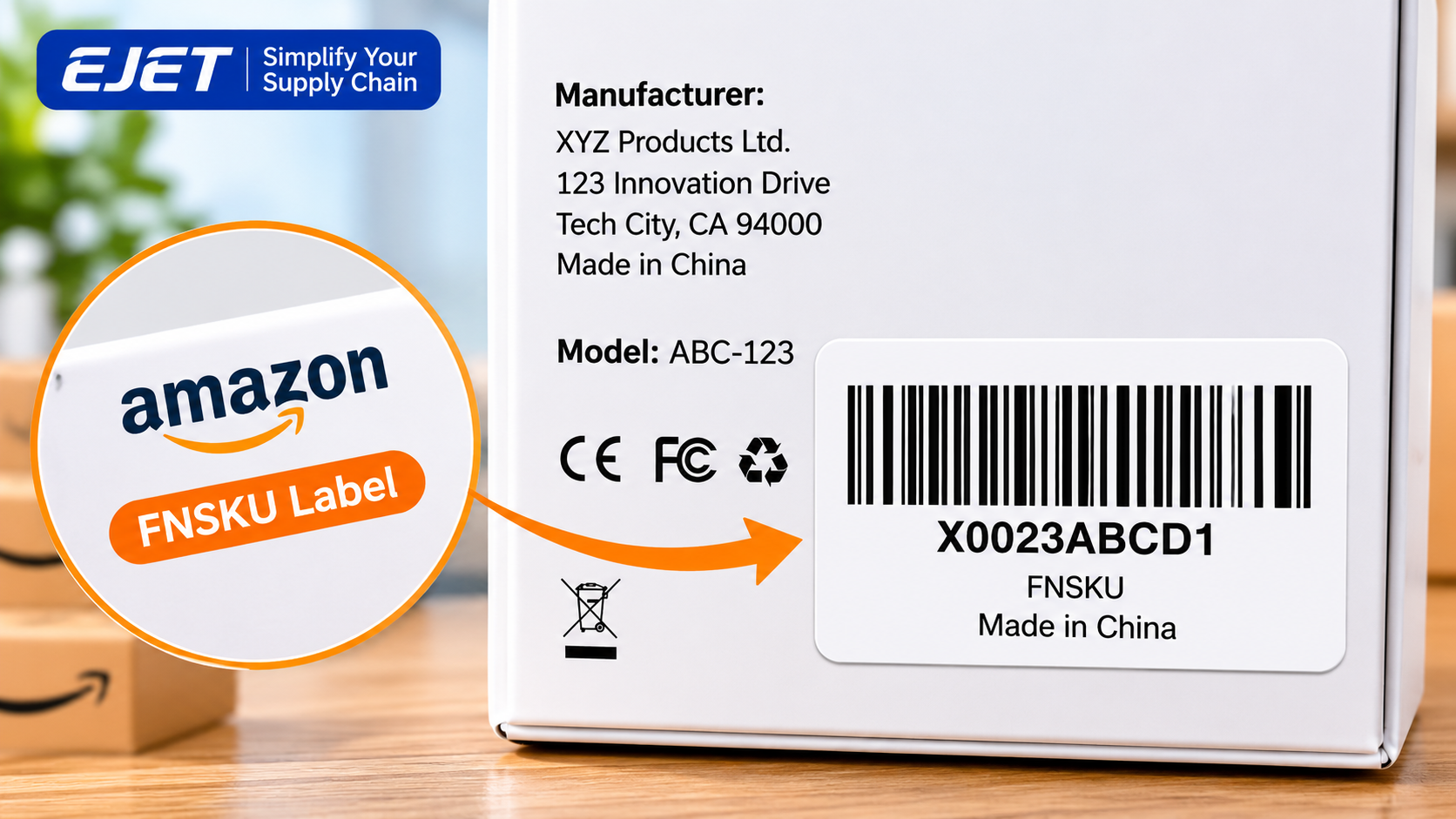
An FNSKU label connects a product in Amazon’s fulfillment network to a seller’s inventory, helping Amazon identify the correct offer during fulfillment.
For sellers using Fulfillment by Amazon (FBA), understanding this label means knowing when it is required, how to produce it, and where to place it.
It is a small part of product labeling with an important operational role.
What is an FNSKU label on a product?
FNSKU stands for Fulfillment Network Stock Keeping Unit. An FNSKU label is an Amazon inventory label containing a scannable barcode and identifying information that links the product to a seller’s FBA offer.
Unlike a general manufacturer barcode, an Amazon FNSKU identifies inventory within Amazon’s fulfillment system in a seller-specific way.
Think of a product sold by several businesses. The retail packaging may look identical, but Amazon still needs to associate inventory with the appropriate seller’s offer.
The FNSKU provides that connection; it is not simply a decorative replacement for the barcode already printed on the box.
An Amazon-generated item label typically includes:
- A scannable barcode: The machine-readable element used for identification.
- The corresponding FNSKU: The readable identifier associated with the barcode.
- The product title: A reference for matching the label to the item.
- The product condition: Information such as new or used, as applicable.
When checking a label, read the descriptive text as well as examining the barcode. A clean printout is not enough if the title or condition belongs to a different offer. Amazon specifically advises matching labels to units using the product title and condition.
FNSKU, ASIN, SKU, and UPC serve different purposes
Several identifiers can appear in the same inventory workflow, making them easy to confuse. The important distinction is what each identifies: a catalog product, your inventory reference, a manufacturer’s product identifier, or your offer within Amazon’s fulfillment network.
Amazon’s documentation treats these as separate identifiers, not interchangeable names for the same code.
|
Identifier |
Main purpose |
Practical distinction |
|---|---|---|
|
ASIN |
Identifies a product in Amazon’s catalog |
Refers to the catalog product rather than your internal stock code |
|
Seller SKU |
Identifies an inventory item or offer in your business |
Serves as your seller-side inventory reference |
|
UPC or EAN |
Provides a manufacturer product barcode |
Can support FBA tracking only where eligible |
|
FNSKU |
Identifies inventory within Amazon’s fulfillment network |
Connects labeled inventory to the relevant seller offer |
These distinctions are reflected in Amazon’s inventory documentation and barcode requirements.
For your own workflow, maintain a simple mapping sheet connecting the seller SKU, product description, variation, and FNSKU. Add a product photo if similar packaging makes identification difficult.
This gives the person labeling products a reference that does not depend on remembering which code belongs to which item.
When do you need an FNSKU label?
You need an Amazon barcode label when Amazon requires Amazon-barcode tracking for your inventory. In the US store, barcode requirements changed on March 31, 2026: resellers must use Amazon barcodes even when products already carry manufacturer barcodes.
Eligible brand owners can continue using manufacturer barcodes without additional stickers, subject to Amazon’s requirements.
That distinction matters because older advice may describe manufacturer barcodes as an option available more broadly. Before preparing inventory, check the current requirements for your marketplace, seller status, and specific products.
Do not assume that a visible UPC automatically makes an additional label unnecessary.
A practical preproduction check should cover:
- Marketplace: Confirm that the instructions apply to the country receiving the shipment.
- Seller status: Check whether Amazon treats your offer as eligible for manufacturer-barcode tracking.
- Product eligibility: Review any product-specific barcode requirements.
- Inventory setup: Confirm the barcode method associated with the actual offer you plan to send.
Use this checklist before ordering packaging or sending label files to a supplier. Treat the barcode requirement as a decision to verify, not a detail to resolve after units have been packed. Keep a record of the approved labeling instructions with the shipment paperwork.
Why accurate labeling deserves attention
Amazon uses barcodes to identify and track inventory throughout fulfillment. Consequently, correct labeling is part of making inventory identifiable, rather than merely making a shipment look organized. Amazon also warns that failing to cover the original manufacturer barcode when applying an Amazon barcode can cause receiving errors.
The practical lesson is to check three things together: the right product, the right label, and a readable application. Checking only one leaves the job unfinished. For example, a perfectly readable label on the wrong variation still fails the product-matching check.
Consider a hypothetical shipment containing two nearly identical sizes of the same accessory. A sensible process would separate the sizes before printing, verify one completed unit from each batch, and keep unused labels away from the next batch. This approach makes accuracy part of the workflow instead of relying entirely on a final inspection.
FNSKU labeling also has limits. Amazon describes Transparency codes—not ordinary FNSKU labels—as item-level authentication codes designed to protect against counterfeiting.
Keep inventory identification and product authentication separate when explaining what each barcode accomplishes.
Generate and print labels with a controlled workflow
Start with the label-generation tools associated with your inventory in Seller Central. Amazon provides a way to print item labels and advises matching the resulting labels to products using the title and condition. For larger batches, make sure the generated files include every relevant page rather than assuming the first page covers the shipment.
Avoid rebuilding the barcode from memory or copying a label from a superficially similar product. Instead, organize the files around the inventory you intend to send. Use clear filenames and keep only the approved version in the folder shared with your supplier or preparation team.
A repeatable printing routine can be straightforward:
- Confirm the offer. Compare the product, variation, and condition with your preparation records.
- Generate the appropriate labels. Save the file alongside the relevant shipment documents.
- Check the quantity. Reconcile labels needed against units being prepared.
- Print a small test batch. Inspect the text, barcode, alignment, and adhesive fit.
- Approve the output. Only then print the remaining quantity and release it for application.
Amazon’s labeling guidance recommends black printing on non-reflective adhesive paper and identifies a laser printer at 300 DPI as a suitable option for best results.
Its guidance also rejects damaged or photocopied labels. Follow the current specifications and the selected template rather than stretching a barcode to fill whatever label stock is available.
As an additional quality-control step, scan a printed sample where equipment is available and compare the result with your approved record. Repeat the check after changing printer settings or label stock. Keep a sample of the accepted output so another team member can see what passed inspection.
Where should you place the Amazon FNSKU barcode label on a product?
Place the Amazon FNSKU barcode label on a smooth, flat, accessible surface of the sellable unit, avoiding corners, edges, and curves. Where additional preparation packaging is required, Amazon instructs sellers to put labels on the outside so they remain easy to scan. When the product needs no extra packaging, cover the original manufacturer barcode to prevent accidental scanning.
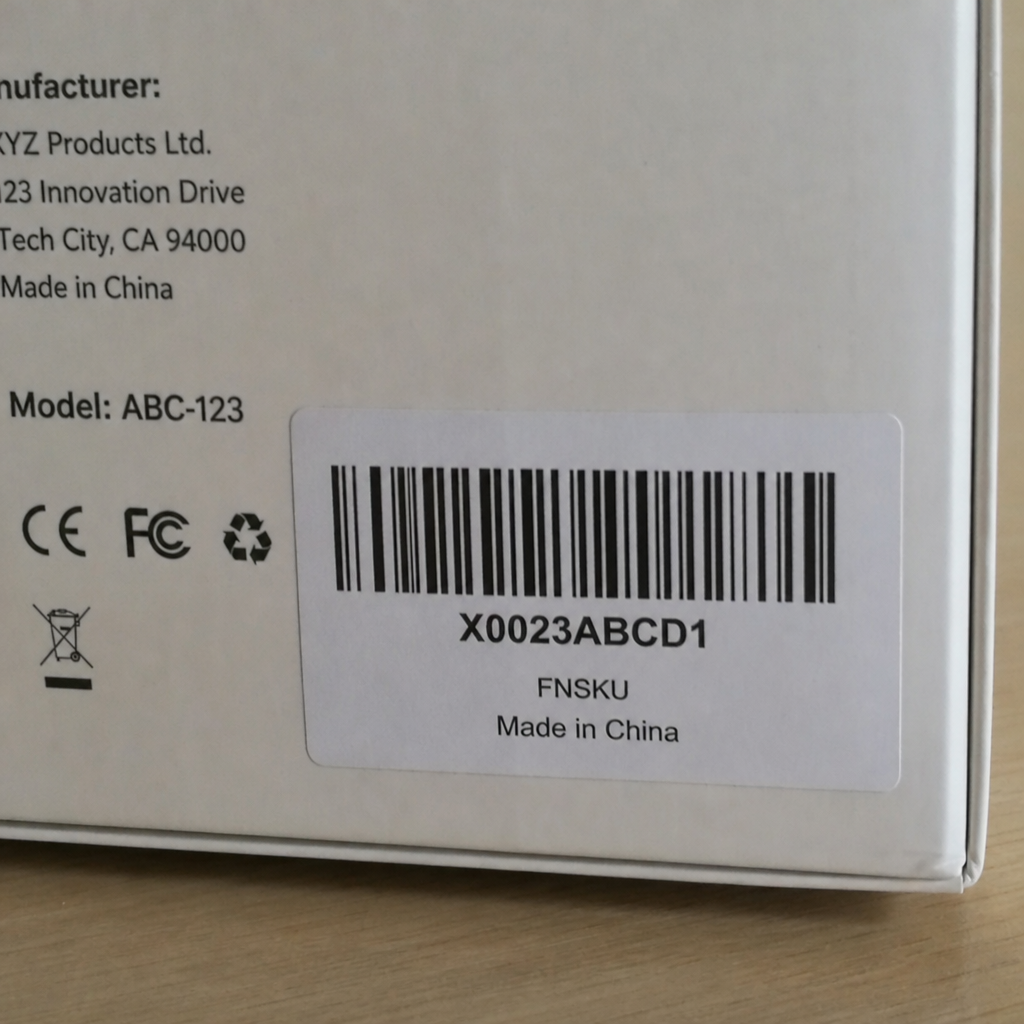
Inspect the finished package, not just the product before wrapping. A useful placement decision must still work once the item is ready to ship. Amazon’s instructions distinguish item identification from shipment identification, so do not treat a barcode on the shipping carton as a substitute for the required product label.
For the inspection, look for wrinkling, lifting edges, incomplete printing, and an obstructed barcode. Avoid choosing a position merely because it is convenient for the person applying the sticker. Pick a repeatable locati0n that makes inspection straightforward for everyone handling that product.
Do not cover a Transparency code with an FNSKU label. Amazon says Transparency codes must neither cover nor be covered by another label. If packaging contains several different codes, identify their purposes before deciding what to obscure. (sell.amazon.com)
Assign responsibility before inventory leaves your control
For US FBA shipments, Amazon discontinued prep and item labeling services starting January 1, 2026.
The change also applies to inventory passing into FBA through services including Amazon Warehousing and Distribution, Amazon Global Logistics, Amazon SEND, and Supply Chain Portal. Sellers should therefore arrange required labeling before the inventory reaches FBA rather than expecting Amazon to perform it.
You can organize the work internally, through a manufacturing partner, or through a third-party preparation provider. Amazon identifies these as approaches sellers use for preparation and labeling. Whichever arrangement you choose, put the responsibility in writing so label generation, application, and verification do not fall between teams.
Your handoff instructions should include:
- Approved label files: Name the exact file associated with each product and variation.
- Product references: Provide descriptions or photos that distinguish similar-looking units.
- Placement guidance: Include a photo of the approved locati0n on the finished package.
- Quantity controls: Specify how labeled units and unused labels should be reconciled.
- Exception handling: Explain who must approve unclear matches, damaged labels, or packaging changes.
Ask the person doing the work to return a photo of the first completed unit before processing the batch. For a new product or supplier, review the handoff together rather than relying on an email attachment alone. The goal is an instruction set another person can follow without guessing.
Build a final product labeling checkpoint
Make the last inspection a separate task from applying stickers. Give the reviewer the approved inventory record and ask them to compare it with completed units. A useful check tests the match, print quality, and placement together rather than simply counting how many stickers were used.
Use the following release checklist:
- The physical product matches the intended variation, pack configuration, and condition.
- The label corresponds to the approved product record.
- The printed barcode and text are complete and legible.
- The label sits securely on the completed sellable package.
- Required codes remain accessible, with no unresolved placement conflicts.
- Prepared quantities agree with the shipment records.
- Unused or superseded labels have been removed from the work area.
If a check fails, pause the affected batch and establish the extent of the problem before continuing. Do not fix one visibly incorrect unit and assume the rest are correct. Review the source file, the product separation process, and the application instructions to identify where the mismatch began.
Keep the process proportionate to the operation. A small batch may need a simple signed checklist, while a larger handoff may justify photos and a documented review. Either way, make the approval visible so nobody has to infer whether inspection happened.
The takeaway: treat labels as inventory controls
An FNSKU label does its job when it identifies the correct offer and remains readable on the prepared unit. Amazon’s barcode rules make understanding the required identification method an essential part of preparing FBA inventory. (sellercentral.amazon.com)
Before the next shipment, confirm the applicable requirements, approve the label-to-product match, and inspect finished packaging. Keep the process simple enough to repeat and clear enough to delegate. That turns labeling from a last-minute packing task into a deliberate inventory control.
Frequently Asked Questions About FNSKU Labels
What is an FNSKU label, and why is it important?
An FNSKU (Fulfillment Network Stock Keeping Unit) label is a unique identifier used by Amazon to track and manage inventory in its fulfillment centers. It connects a seller’s product to their specific offer, ensuring that orders are fulfilled correctly.
When do I need to use an FNSKU label?
You need to use an FNSKU label when your inventory is being fulfilled by Amazon (FBA) and the barcode tracking policies require it. This is essential for maintaining accurate inventory tracking and ensuring proper order fulfillment.
How do I generate FNSKU labels for my products?
FNSKU labels can be generated through Amazon Seller Central. After creating your product listing, you can access the 'Manage Inventory' section, where you'll find options to print item labels for your FBA inventory.
Where should I place the FNSKU label on my product?
FNSKU labels should be placed on a smooth, flat, and accessible surface of the product. Avoid corners, edges, and curves to ensure they can be easily scanned during fulfillment.
What should I do if a product has a manufacturer barcode already printed?
If a product already has a manufacturer barcode, you must cover it with the FNSKU label to prevent scanning errors. Proper placement of the FNSKU label is crucial to avoid confusion during order fulfillment.